 WhatsApp Us Now
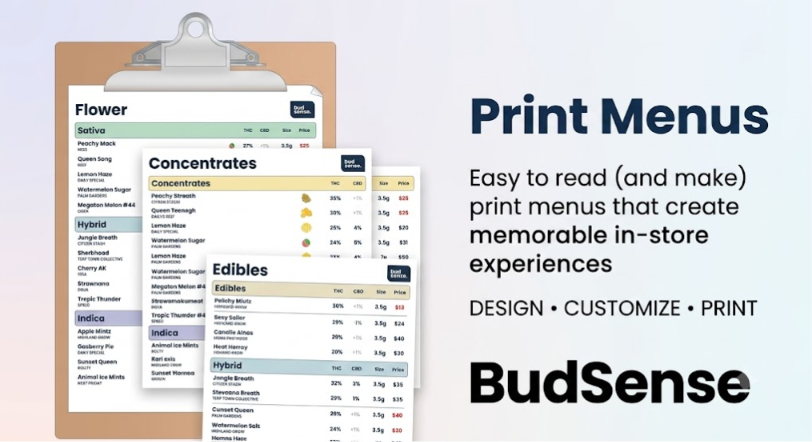
Walk into a modern cannabis dispensary, and you will likely be greeted by high-definition digital screens, glowing display cases, and tablet-based ordering stations. There is no denying that technology has elevated cannabis retail. However, amid this digital evolution, many dispensaries are discovering a surprising truth: a large portion of customers still look for a physical, paper menu.
While digital screens are exceptional for showing fast-moving inventory at a distance, they aren’t the perfect solution for every shopper. Some customers feel rushed looking at a wall monitor, while others simply prefer a tactile, hands-on reading experience.
For forward-thinking retailers, the goal isn’t to choose between paper and screens. Instead, it’s about creating a unified shopping experience where Dispensary print menus act as a premium, low-stress extension of your digital ecosystem. Here is why physical menus remain a vital asset for modern dispensaries, how they improve consumer psychology, and how to manage them without creating operational chaos.
The Psychology of Paper: Why Some Shoppers Prefer Print
Retail design isn’t just about efficiency; it’s about comfort. Providing an physical menu satisfies distinct customer needs that digital interfaces often overlook.
1. Curing “Menu Anxiety”
For new, older, or medical consumers, walking into a high-tech showroom can feel overwhelming. Staring up at a flashing screen while a line forms behind them creates subtle psychological pressure. A paper menu gives these shoppers permission to slow down. They can step away from the counter, sit down in a waiting area, and read through your offerings at their own pace without feeling rushed.
2. A Dedicated Consultation Tool
Cannabis retail thrives on education. When a budtender is guiding a customer through complex product choices, having a shared physical menu layout on the counter completely changes the interaction. The budtender can physically point to specific terpene profiles, highlight cannabinoid ratios, or circle recommended strains. It transforms a transaction into a personalized consultation.
3. Accessible Layouts for Deep Browsing
Wall monitors are excellent for scanning categories, but they have layout constraints. A well-designed, multi-page booklet or a structured tri-fold menu allows you to organize a high volume of information cleanly. Customers can easily compare fine details across dozens of flower varieties, concentrates, and edibles side-by-side without waiting for a screen to rotate to the next slide.
The Operational Nightmare: Keeping Paper Synchronized
While the benefits of paper are clear, any dispensary manager will tell you that traditional print menus are an operational headache. Cannabis inventory moves at lightning speed.
Historically, this meant dispensaries faced two bad options:
- Running out of stock mid-shift and forcing budtenders to cross off items with a black marker, making the premium menu look messy and unprofessional.
- Wasting countless hours every week manually copying inventory data into a word processor, reformatting the pages, and printing out stacks of paper that become outdated almost immediately.
To make paper menus viable in a modern retail setting, the printing process must be completely automated.
The Modern Solution: Automated, On-Demand Printing
The key to unlocking the power of physical menus without burning out your inventory team is live data integration. By using intelligent retail platforms, dispensaries can link their paper layouts directly to their central point-of-sale (POS) systems.
Instant Generation
Instead of rebuilding spreadsheets or adjusting text boxes every morning, inventory managers can hit a single button to generate a perfectly formatted PDF containing only the items currently in stock. If a major product sells out or a price updates mid-day, a fresh, flawless layout can be generated and printed in less than sixty seconds.
Seamless Visual Branding
A printed menu should never look like an unformatted office document. Modern menu platforms allow you to establish a consistent visual identity—complete with your brand’s unique colors, fonts, logo placement, and structured categories. This ensures that your paper menus perfectly match the design theme of your wall TVs, jar labels, and online ordering menus.
Strategic Content Control
Automated printing platforms also allow managers to filter what appears on paper versus what stays on screen. For instance, you can choose to generate a highly detailed print layout specifically for your connoisseur-grade flower and concentrates, while leaving fast-moving, high-turnover items exclusively on your digital screens. This saves paper, cuts down printing costs, and keeps your physical collateral highly targeted.
Conclusion
The most successful cannabis dispensaries don’t force their customers into a single, rigid path. They understand that a truly premium retail experience offers choice. By pairing the speed and automation of digital inventory with the comforting, tactile nature of a beautifully designed physical layout, you ensure that every guest shops comfortably. To fully remove the administrative friction of managing multiple channels and gain absolute control over your store’s physical presentation, partnering with a dedicated ecosystem like BudSense ensures that your print menus, digital displays, and product tags stay completely synchronized, effortlessly updated, and perfectly tailored to grow your business.
Frequently Asked Questions
1. How do print menus stay accurate if cannabis inventory sells out quickly?
Modern software eliminates manual entry by pulling live inventory metrics directly from your point-of-sale (POS) system. When your inventory changes, you simply click a button on your dashboard to instantly generate an updated, perfectly formatted menu layout ready for your back-office printer.
2. Can we customize the look of our printed menus to match our store’s style?
Absolutely. You don’t have to settle for boring black-and-white spreadsheets. Advanced design engines allow you to build custom templates that incorporate your exact brand colors, logos, typography, and preferred spacing, ensuring a premium feel.
3. Do paper menus replace digital menus, or should we use both?
They are designed to work together. Wall monitors are perfect for quick glances and displaying fast-moving items to the entire room, while paper layouts are ideal for deep-dive browsing, waiting areas, and long-form consultations at the budtender counter.
4. How do automated print layouts help save paper and ink costs?
Because the layouts are smart, they are engineered to maximize page space efficiently without clutter. Furthermore, you can use dashboard filters to print specific sub-menus (like a dedicated “Concentrates Guide” or “Top Shelf Flower Menu”) rather than printing your entire inventory every time.
5. Is it possible to include complex data like terpenes or badges on paper?
Yes. Just like modern digital screens, automated printing platforms feature expanded cannabinoid and total terpene support. This means your testing data, product descriptions, and specialized promotional badges will transfer flawlessly to your paper menus in a clean, readable grid layout.


