 WhatsApp Us Now

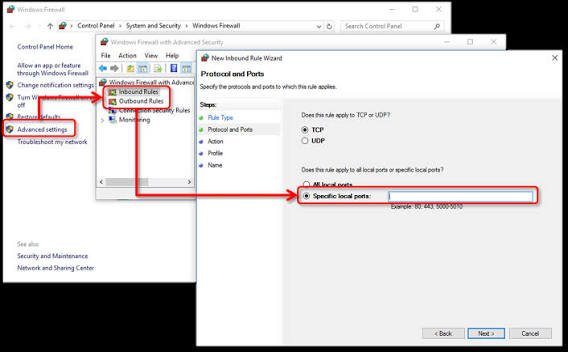
Windows Firewall blocking QuickBooks means the built-in security firewall on your computer is cutting off communication with another computer, Intuit’s servers or a needed update, a payroll download or any company file network access. It’s not malicious, just over zealous and mistaking QuickBooks for some unknown malware.
What gets confusing is that QuickBooks rarely gives any indication something is wrong with the firewall, an update simply stops halfway, a multi user connection fails in a frustratingly opaque way, some error code flashes by like 6000-something or H202, and nowhere does it mention to check your firewall. I’ve seen users burn an hour of troubleshooting on what they think is a corrupted company file, only to discover in the next hour that it was a new security policy pushed out by the IT department that Friday morning.
What’s actually causing it
Almost always a few possible culprits:
- a recent Windows update reset firewall settings that were set up previously
- QuickBooks was just installed for the first time, or reinstalled
- an antivirus firewall is interfering in addition to Windows Firewall
- a change in network type (home vs. work)
- a new IT security policy
- wrong ports closed for the specific QuickBooks version
- a multi user hosting issue where the server has a closed port instead of the workstations
The last one in particular is a common gotcha, users assume it’s their computer, when in fact it’s the one hosting the company file with the communications issue.
Working through the fix
Best done in order, as most people will have found a solution by step 3 or 4.
- Test first by temporarily disabling Windows Firewall, attempting whatever failed, and seeing if it works. Doing so confirms it as the culprit, and turning it back on right away is important for security.
- A lot of this can be automated with the QuickBooks Tool Hub, Network Issues tab, QuickBooks Program Diagnostic Tool.
- Adding QuickBooks as an exception is an option – go to Windows Defender Firewall, Allow an app through firewall, Change Settings, Allow another app, browse to your QuickBooks install directory, add QBW32.exe, check Private and Public boxes.
- Opening up the specific ports required by your version of QuickBooks is another possibility, though these change every year or with every version change, so double check Intuit’s support for the correct numbers.
- Check separately with your antivirus, as McAfee, Norton, Avast, etc. each have their own firewall layer on top of Windows. Add exceptions to those as well.
- Re-adding the two services for QuickBooks specifically – QBCFMonitorService and QBDBMgrN – may be necessary on the hosting computer.
- Restart the QuickBooksDBXX service with services.msc, and reboot both the server and workstation. Changes to the firewall often require a full restart to take effect.
If this doesn’t solve the issue, it’s likely not a firewall problem at all, and worth double checking the broader network setup outlined in our guide on setting up QuickBooks for multi user access, as a lot of similar issues are actually related to problems hosting on a network one layer deeper.
If the computer is on a domain and IT controls the firewall with Group Policy, you likely can’t make these changes yourself, and shouldn’t try. Exceptions on a domain managed machine will either not persist, be overwritten on policy refresh, or get flagged and rolled back entirely. The better alternative is to get your IT department to add the exception at the policy level so it takes effect on all affected machines instead of going through each one individually. Send them the exact port numbers and executable paths instead of just saying “QuickBooks isn’t working,” and it’ll get resolved faster that way. Accounting Assist Pro can help you troubleshoot QuickBooks multi-user access and network configuration issues. For assistance, call +1-888-892-5727.
FAQs
How do I know if Windows Firewall is blocking QuickBooks?
Disable it temporarily, try what failed, and see if it works. If it does, enable it back right away.
What ports does QuickBooks need open?
It depends on the version, and Intuit often changes them with each release, so double check the current support documentation for the exact numbers.
Can I just leave Windows Firewall off instead?
You can, but you shouldn’t. Leaving it off entirely leaves your system exposed to far greater risks than just QuickBooks, and exceptions are generally safer and faster to set up than leaving everything open.
Why did this just start happening when QuickBooks was working fine before?
Something always changes with these kinds of problems, it was fine until something did change. This can be a Windows update, an antivirus update, a network change, or even new policies from your IT department, even if nothing was done with QuickBooks itself.
Does this also affect QuickBooks Online, or just Desktop?
It mainly affects Desktop, and particularly multi-user Desktop or hosting company files on a local network as opposed to in the cloud. QuickBooks Online uses your browser and is far more likely to have general connectivity or browser specific issues than firewall related ones.


