 WhatsApp Us Now
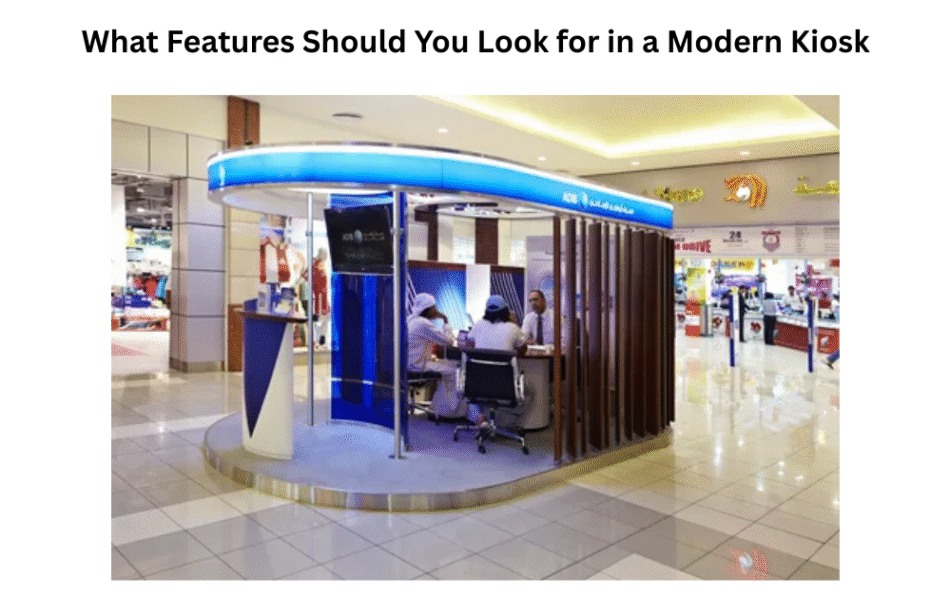
Contemporary kiosks are now in use by many businesses globally. Whether in shopping malls, restaurants or airports, for example, business owners need kiosks to serve customers more quickly and more intelligently. But kiosks are not all created equal. There are a lot of things you should consider when choosing what kind of kiosk to use in your business, so it’s important for you to know what features will make the machine efficient and easy to use with a minimal amount of problems involved. In this post, we will talk about the must-have features of a modern kiosk.
Note: Kiosks in UAE and Dubai offer modern self-service solutions for businesses, helping customers order, pay, and access information quickly and conveniently.
What is a Modern Kiosk?
But before we get into features, it helps to know what a modern kiosk is.
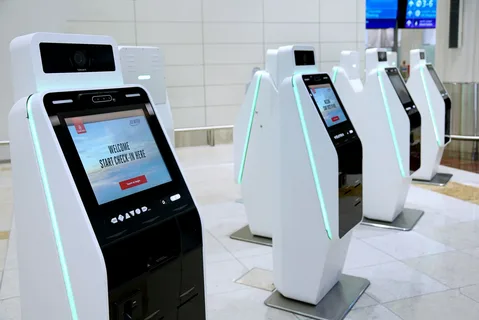
Nowadays, a kiosk is an automatic transaction machine or piece of equipment that accelerates service and allows customers to accomplish services provided without needing help from personnel. These include things like ordering food, purchasing tickets, checking into a hotel, printing documents and paying for anything. Contemporary kiosks are simple to use, fast, and available.
Where old kiosks have existed, however, new kiosks are typically digital and interactive, and can sometimes also be connected online. They come driven by touchscreens, software apps and sometimes even a nip of artificial intelligent to ease the life of those pressing the buttons.
Why Choosing the Right Features is Important
Not every kiosk is suitable for every business. Choosing the right features ensures your kiosk:
- Works efficiently
- Is easy for customers to use
- Reduces waiting times
- Increases sales
- Fits your business needs
If you pick a kiosk without the right features, you might face problems like frequent breakdowns, customer frustration, or even loss of revenue. Therefore, understanding which features are essential is the first step in making a smart investment.
Key Features to Look for in a Modern Kiosk
Modern kiosks come with many features, but not all are necessary for every business. Below is a detailed guide to the features that are most important.
1. User-Friendly Touchscreen
The touchscreen is the most important part of a kiosk. Customers interact with the kiosk through this screen, so it must be clear, responsive, and easy to navigate.
Why it matters:
- A slow or unresponsive screen can frustrate customers.
- A clear display ensures that people of all ages can use the kiosk easily.
Tips for a good touchscreen:
- Look for high-resolution screens that are bright and easy to read.
- Make sure the touchscreen works well with both fingers and styluses.
- Ensure the screen supports multiple languages if your business serves a diverse audience.
2. Reliable Software
The software inside the kiosk controls everything, from displaying menus to processing payments. Good software is fast, reliable, and secure.
Why it matters:
- Poor software can cause errors, crashes, or slow response times.
- Reliable software ensures a smooth experience for customers and reduces staff intervention.
What to look for:
- Software that is regularly updated
- Easy-to-use interface for both staff and customers
- Compatibility with different payment methods
3. Payment Options
A modern kiosk should offer multiple payment options to make it convenient for customers. This includes credit cards, debit cards, mobile wallets, and sometimes cash.
Why it matters:
- Not all customers carry cash or the same type of card.
- Offering multiple options increases the chances of completing a sale.
Additional features:
- NFC (Near Field Communication) for contactless payments
- Integration with apps like Apple Pay, Google Pay, or Samsung Pay
- Secure payment processing to protect customer data
4. Connectivity
A kiosk is most effective when it is connected to the internet or your internal network. Connectivity allows the kiosk to:
- Update prices and products in real-time
- Connect to your business database
- Provide online services like ticket booking or food delivery
Why it matters:
- Offline kiosks have limited functionality.
- Good connectivity ensures smooth communication and faster service.
Tips:
- Look for kiosks that support Wi-Fi, Ethernet, or mobile data connections.
- Ensure secure connections to protect customer and business information.
5. Durable Hardware
Kiosks are used by many people every day, so they need to be strong and durable.
Why it matters:
- Durable hardware reduces maintenance costs
- It ensures the kiosk can withstand heavy use in busy locations
Things to check:
- Strong materials like metal or high-quality plastic
- Anti-vandalism features
- Spill-resistant or water-resistant screens, especially for food courts or outdoor areas
6. Customizable Interface
Every business is different, so the kiosk interface should be customizable to suit your brand and customer needs.
Why it matters:
- A branded interface improves customer trust and recognition
- Customization allows you to prioritize your most popular products or services
Options to consider:
- Ability to change colors, logos, and layout
- Add promotions or announcements
- Multi-language support
7. Accessibility Features
Modern kiosks should be designed to accommodate all customers, including those with disabilities.
Why it matters:
- Ensures compliance with local laws and regulations
- Expands your customer base by making services accessible to everyone
Features to look for:
- Adjustable screen height for wheelchair users
- Voice commands or audio guidance
- Large buttons and high-contrast screens for visually impaired users
8. Remote Management
Remote management allows business owners to control and monitor kiosks from anywhere.
Why it matters:
- Saves time and reduces the need for on-site visits
- Allows for quick updates, troubleshooting, and monitoring of performance
Remote management features:
- Update menus, prices, or software remotely
- Monitor usage statistics and sales reports
- Receive alerts if the kiosk encounters an error
9. Security Features
Security is a top priority for modern kiosks, especially if they handle payments or personal data.
Why it matters:
- Protects your business and your customers
- Prevents theft, fraud, or data breaches
Security measures to consider:
- Encrypted payment processing
- Secure login for staff management
- Physical locks to prevent tampering
10. Maintenance and Support
Even the best kiosk will need occasional maintenance. Choosing a kiosk with good support ensures minimal downtime.
Why it matters:
- Quick support reduces revenue loss during downtime
- Regular maintenance keeps the kiosk working efficiently
What to look for:
- Warranty and service options
- Easy access to spare parts
- Responsive technical support team
Benefits of Choosing the Right Kiosk Features
Choosing a kiosk with the right features can bring many benefits to your business. Some of the main advantages include:
- Better Customer Experience: Customers enjoy using a kiosk that is fast, easy, and intuitive.
- Increased Sales: Kiosks with multiple payment options and smooth software can boost sales.
- Reduced Operational Costs: Self-service kiosks reduce the need for extra staff.
- Brand Recognition: Customizable interfaces and branding improve customer loyalty.
- Data Collection: Modern kiosks can track customer behavior and help in business planning.
How to Choose the Best Kiosk for Your Business
When selecting a kiosk, follow these simple steps:
- Identify Your Needs: Determine the tasks your kiosk will perform, such as ticketing, ordering, or information display.
- Set a Budget: Decide how much you are willing to invest in a kiosk. Remember, high-quality features may cost more but save money in the long run.
- Check Features: Make sure the kiosk has the key features listed above.
- Consider Location: Indoor kiosks may differ from outdoor kiosks in durability and screen brightness.
- Read Reviews: Look for customer feedback to ensure reliability.
- Test Before Buying: If possible, test the kiosk to see how easy it is to use.
Conclusion
Modern kiosks are more than just machines; they are a bridge between businesses and customers. The right features can make a kiosk an effective tool to improve customer service, increase sales, and reduce operational costs.
When looking for a kiosk, focus on user-friendly touchscreens, reliable software, multiple payment options, connectivity, durable hardware, customization, accessibility, remote management, security, and support. By choosing the right features, you can ensure your kiosk serves your customers well and supports your business goals.
For more insightful articles related to this topic, feel free to visit: thestarbiznews.com


