 WhatsApp Us Now
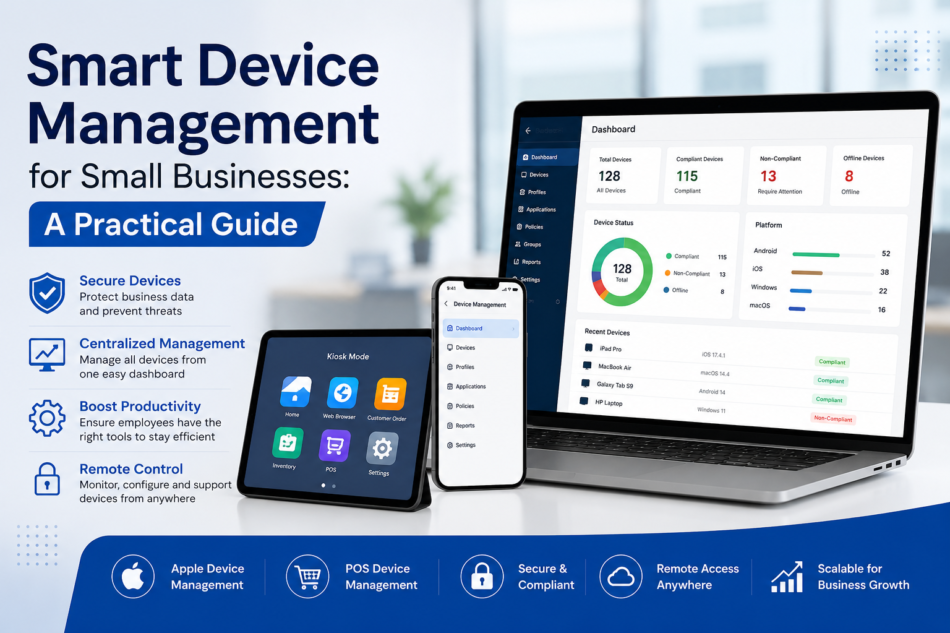
Small businesses increasingly rely on smartphones, tablets, laptops, POS terminals, and other connected devices to run everyday operations. While these devices improve productivity and customer service, managing them manually can quickly become difficult as a business grows.
This is where smart device management becomes valuable. Instead of configuring, monitoring, securing, and troubleshooting every device individually, businesses can use a centralized management platform to control their device fleet remotely.
For small businesses with limited IT resources, smart device management can reduce administrative work, strengthen security, and provide greater visibility into business devices.
What Is Smart Device Management?
Smart device management is the centralized process of managing, monitoring, securing, and supporting business-owned devices from a single platform.
Depending on the organization, these devices can include:
- Smartphones and tablets
- MacBooks and other computers
- POS terminals
- Dedicated kiosk devices
- Rugged enterprise devices
- Shared workplace tablets
- Mobile devices used by remote employees
A device management solution allows administrators to apply security policies, distribute applications, configure settings, monitor device status, and take remote actions without physically accessing every device.
Modern platforms can also support multiple operating systems, making them useful for businesses with mixed device environments.
Why Small Businesses Need Smart Device Management
Many small businesses start by managing devices manually. An employee may configure a new tablet, install applications, change settings, and troubleshoot problems whenever something goes wrong.
That approach may work with five devices, but it becomes inefficient with 20, 50, or 100 devices.
Smart device management provides a more scalable approach.
1. Centralized Device Control
A centralized dashboard gives IT administrators visibility into the organization’s devices. Instead of checking every smartphone, tablet, or computer individually, administrators can manage policies and configurations from one location.
This is particularly useful for businesses operating multiple offices, retail locations, warehouses, or remote teams.
2. Better Security
Unmanaged devices can create security risks. Employees may install unauthorized applications, use weak passwords, access unsafe websites, or connect devices to untrusted networks.
Smart device management allows businesses to establish consistent security policies across managed devices.
Administrators can control application access, enforce device restrictions, configure security settings, and remotely lock or wipe devices when necessary.
3. Faster Employee Onboarding
Setting up devices manually for every new employee consumes valuable time.
With centralized management, administrators can prepare device configurations, applications, and security policies before handing devices to employees. This helps create a more consistent onboarding experience and reduces repetitive IT tasks.
Apple’s device management framework, for example, supports remote configuration, policy enforcement, software updates, and remote lock or wipe capabilities.
Apple Device Management for Small Businesses
Apple devices are widely used by small businesses because of their hardware reliability and ecosystem. However, managing multiple MacBooks, iPhones, and iPads manually can become challenging.
Apple device management helps businesses centrally manage these devices while maintaining organizational security requirements.
With Apple Business and compatible management services, businesses can use automated enrollment and zero-touch deployment to simplify device setup. Apple states that Automated Device Enrollment allows organization-owned devices to be configured for management during initial setup.
For a small business, this can be especially useful when employees work remotely. A MacBook can be shipped directly to an employee, while required configurations and applications can be applied through the organization’s device management system.
Key Apple device management capabilities can include:
- Automated device enrollment
- Application deployment
- Configuration management
- Security policy enforcement
- Device monitoring
- Remote lock and wipe
- OS and software management
This allows small businesses to maintain control without requiring a large internal IT department.
POS Device Management: Protecting Retail Operations
Retail stores, restaurants, and hospitality businesses increasingly depend on tablets and POS systems for payments, orders, inventory, and customer interactions.
This makes POS device management an important part of modern business operations.
A compromised or incorrectly configured POS device can disrupt transactions and affect customer experience. Centralized management helps businesses maintain consistent configurations across POS devices and quickly respond to operational problems.
With POS device management, businesses can:
- Control which applications are available
- Restrict unnecessary device functionality
- Configure devices remotely
- Monitor device status
- Deploy required applications
- Apply security policies
- Support devices remotely
- Lock devices into dedicated-use environments
For example, a restaurant with tablets used exclusively for order taking can configure those tablets to run only approved applications. This reduces unnecessary access and helps employees focus on their intended tasks.
Smart Device Management and Kiosk Mode
Small businesses often use tablets as self-service terminals, digital signage systems, check-in stations, ordering terminals, or information kiosks.
In these scenarios, employees or customers do not need unrestricted access to the entire device.
Kiosk mode can turn a general-purpose tablet into a dedicated business device by restricting access to selected applications and functions.
Combined with smart device management, kiosk deployments can be centrally configured and monitored. Businesses can update applications, change policies, and troubleshoot devices remotely instead of visiting every location.
This is particularly valuable for retail stores, restaurants, healthcare facilities, educational organizations, and hospitality businesses with distributed devices.
Choosing MDM Software in the US for a Small Business
Businesses searching for MDM Software in the US have many options, but choosing a solution based solely on the number of features can lead to unnecessary complexity.
A small business should evaluate whether the platform fits its actual operational requirements.
Important factors include:
Ease of Use
Small businesses may not have dedicated IT teams. A straightforward dashboard and simplified device enrollment can reduce the learning curve.
Multi-Platform Support
If a company uses Android tablets alongside iPhones, MacBooks, or Windows devices, choosing a platform with broad operating-system support can reduce management complexity.
Remote Management
Remote troubleshooting, configuration, monitoring, and security actions are essential when employees or devices are spread across multiple locations.
Application Management
Businesses should be able to distribute approved applications, manage versions, and restrict unauthorized software where appropriate.
Security Controls
Look for features such as password policies, application restrictions, remote lock, remote wipe, device compliance, and access controls.
Scalability
The platform should work for the company’s current fleet while allowing the business to add devices without dramatically increasing administrative overhead.
EasyControl, for example, positions its platform around centralized device management and supports use cases involving Android, iOS, macOS, Windows, and other enterprise environments. Its MDM-focused resources also emphasize centralized control, security policies, application management, and remote device operations.
Best Practices for Smart Device Management
Implementing device management software is only the first step. Small businesses should also establish clear management policies.
1. Create device groups: Organize devices by department, location, employee role, or business function.
2. Standardize configurations: Use consistent security and application policies across similar devices.
3. Keep software updated: Regular updates help reduce security exposure and improve device reliability.
4. Limit unnecessary applications: Only provide employees with the applications they need to perform their jobs.
5. Monitor device compliance: Regularly review device status and identify devices that do not meet company policies.
6. Prepare for lost devices: Establish procedures for remotely locking or wiping devices when they are lost or stolen.
7. Review policies regularly: Business requirements change, so device policies should be reviewed as the organization grows.
Final Thoughts
For small businesses, managing a growing collection of smartphones, tablets, computers, and specialized devices can quickly become an IT challenge. Smart device management provides a centralized way to address this challenge while improving security, efficiency, and operational control.
Whether a company needs Apple device management for MacBooks and iPhones, POS device management for retail operations, or centralized control over a mixed fleet, a modern device management platform can simplify day-to-day administration.
The key is to choose a solution that is easy to deploy, supports the devices the business actually uses, provides strong security controls, and can scale as the organization grows. With the right approach, small businesses can turn device management from a repetitive IT task into a streamlined and manageable part of their operations.


