 WhatsApp Us Now
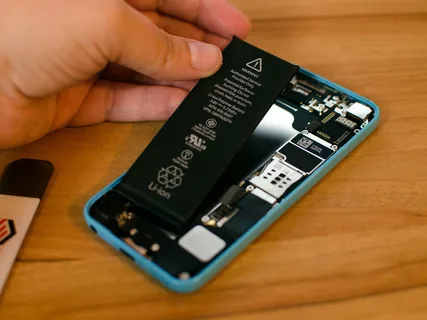
Your phone, laptop, or tablet is only as dependable as the battery that powers it. These devices are central to daily life—handling communication, work, entertainment, and even security. Yet, batteries are often overlooked until they begin to fail. Understanding how often to seek a Battery replacement can help you prevent sudden breakdowns and ensure smooth, reliable performance. At CELLULAR PRO, customers often discover that being proactive with battery care extends the lifespan of their devices while avoiding costly repairs.
Why Batteries Wear Out Over Time
All rechargeable batteries come with a limited number of charge cycles. A charge cycle means using your device from 100% to 0% and charging it back to full. Most lithium-ion batteries, used in modern gadgets, last 300–500 cycles before performance drops significantly. After this stage, your device won’t hold charge as effectively, no matter how carefully you maintain it.
External conditions like heat, constant fast charging, and using low-quality chargers can accelerate wear. Even under ideal conditions, no battery lasts forever, making Battery replacement a routine necessity rather than an exception.
Recognizing the Signs of Battery Decline
It’s easy to ignore small changes in device performance, but recognizing the early signs of battery decline saves both time and money. Key indicators include:
- Sudden drops in battery percentage
- The device running unusually hot during normal use
- Needing to recharge more than once a day
- Swelling of the battery case or screen lifting
- Random shutdowns at higher charge levels
These warning signs point to the need for a new battery before larger problems develop.
How Often Should You Replace Batteries?
Smartphones
Most smartphone batteries last about two years under regular use. Heavy users—those who stream, game, or constantly multitask—may need Battery replacement every 18 months. Moderate users can stretch it closer to three years, but replacement is inevitable once performance noticeably drops.
Laptops
Laptop batteries typically last two to four years, depending on charging habits. Gamers or professionals who run power-intensive programs often need earlier replacement, while lighter users may go longer. Keeping laptops plugged in constantly may also shorten battery health over time.
Tablets and Other Devices
Tablets and smartwatches generally require less frequent charging, so their batteries can last three to four years. Still, the same rules apply: swelling, fast draining, or poor charging signals the need for servicing.
Risks of Avoiding Timely Replacement
Delaying service might save money in the short term, but worn-out batteries can cause serious issues. A swollen battery may damage screens, connectors, or even the motherboard. In rare cases, faulty batteries can leak or overheat beyond safe levels.
Additionally, devices with weak batteries put stress on processors and internal components, reducing performance and creating unnecessary strain. What could have been a simple Battery replacement may escalate into a costly repair if ignored.
Benefits of Proactive Battery Care
Replacing your battery at the right time is a small step with big payoffs.
Better Performance
A new battery restores consistent power, keeping your device responsive without sudden shutdowns or lag.
Cost-Effective Solution
Servicing a battery costs far less than buying a new device. Proactive care keeps your current gadget running strong.
Extended Device Lifespan
Timely Battery replacement prevents damage to other parts, giving your device several more years of reliable use.
Peace of Mind
Knowing your device will last the entire workday or travel without power issues eliminates unnecessary stress.
Choosing a Professional Service Provider
Not all repair shops are the same. The quality of service makes a big difference in device safety and performance. Professional technicians use certified parts, ensure safe handling, and offer warranties on repairs.
When selecting a provider, check for:
- Strong customer reviews and recommendations
- Transparent pricing with no hidden charges
- Certified professionals with proven expertise
- Warranty on parts and labor
- Clear policies regarding data privacy
Trusting the right experts ensures that your Battery replacement not only restores performance but also safeguards your device and data.
Applying E-E-A-T to Battery Services
- Experience: A provider with years of handling smartphones, laptops, and tablets can quickly identify issues and deliver effective solutions.
- Expertise: Certified training ensures technicians follow proper safety and installation standards.
- Authoritativeness: Businesses that publish helpful information and guide customers become reliable voices in their industry.
- Trustworthiness: Transparency, warranties, and secure handling of devices make a service provider one you can rely on.
These principles matter when choosing where to service your valuable gadgets.
Conclusion
Your devices are essential tools, and their batteries are the heartbeat that keeps them running. Understanding when to schedule Battery replacement ensures that your gadgets remain reliable, efficient, and safe. Ignoring the signs of battery decline may cause permanent damage, but proactive servicing extends lifespan and prevents costly breakdowns. By choosing professional, trustworthy technicians, you safeguard not just your device but also the information and productivity it supports. A timely decision today guarantees years of dependable use tomorrow.
Frequently Asked Questions
How do I know it’s time for a battery replacement?
If your device dies quickly, overheats, or shuts off unexpectedly, it’s time to replace the battery.
Can I replace the battery myself?
DIY kits exist, but professional replacements are safer and protect your device from accidental damage.
Will replacing the battery improve overall speed?
Yes. A healthy battery ensures stable power, which improves system performance and reduces lag.
How long does a replacement take?
Smartphone batteries often take under an hour to replace, while laptops or tablets may require a few hours depending on complexity.
Does a new battery last as long as the original?
Yes, if installed by certified professionals using genuine or high-quality parts.


